Liniowe i punktowe mostki cieplne
Wersja z dnia 11:13, 23 maj 2025 autorstwa Staneka (dyskusja | edycje) (→Scenariusz II - metoda obliczania liniowych mostków cieplnych)
| Produkt | InstalSystem 5 |
| Typ artykułu | FUNKCJA I NARZĘDZIE |
| Ostatnia aktualizacja | 2025-04-22 |
Opis
Artykuł opisuje metody obliczania liniowych i punktowych mostków cieplnych dla zakresu Obliczenia cieplne budynku.
Lokalizacja w programie
Metoda obliczania mostków cieplnych jest dostępna do wyboru w oknie Dane ogólne, na zakładce Normy i opcje obliczeń.

Przykłady użycia
Scenariusz I - Uproszczona metoda obliczania liniowych mostków cieplnych
- Dane domyślne:
- W oknie Dane ogólne, Obliczenia cieplne budynku, na zakładce Normy i opcje obliczeń w polu Metoda obliczania mostków cieplnych wybrać Uproszczona. Uwaga: ta metoda jest dostępna dla norm EN;
- (Opcjonalnie) Ustaw tryb auto dla opcji Sposób uwzględniania mostków cieplnych. To automatycznie ustawi status auto mode dla wszystkich pól kolumny ΔUtb (Dodatek na mostki cieplne), dostępnej w zakresie Konstrukcja budynku / Budynek (widok pomieszczeń), z następującymi wartościami domyślnymi:
- ΔUtb = 0.05 W/(m2·K) - dla przegród zewnętrznych (SZ, OZ, DZ, StP, DA) oraz dla przegród mających kontakt z gruntem (SG, PG);
- ΔUtb = 0.00 W/(m2·K) - dla przegród wewnętrznych (SW, StW, DW, OW).
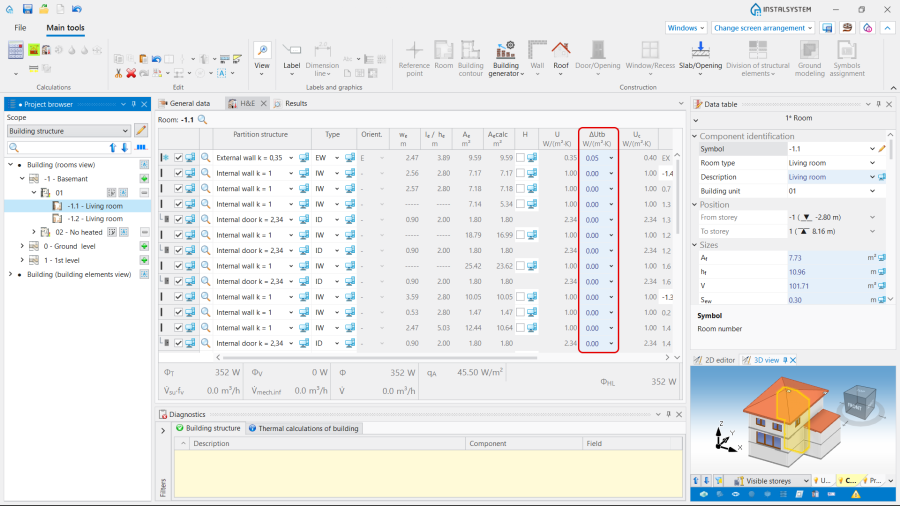
2. Kolumna ΔUtb z ustawionym statusem "auto mode".
- (Opcjonalnie) Wprowadzić ΔU - dostępne dla norm DIN.
- Dane pomieszczeń:
- Wybrać metodę wyznaczania ΔUtb (Dodatek na mostki cieplne) w zakresie Konstrukcja budynku / Budynek (widok pomieszczeń):
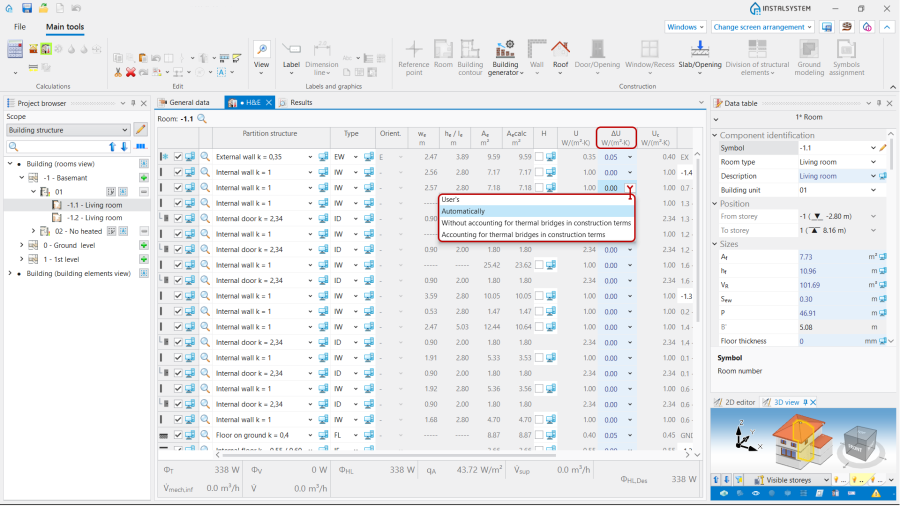
3. Dodatek na mostki cieplne.
- Użytkownika - pozwala na samodzielne ustalenie wartości dodatku;
- Automatycznie - inicjuje wartości domyślne zgodnie z trybem auto mode;
- Bez budowlanego uwzględnienia mostków cieplnych - ΔUtb = 0.05 W/(m2·K);
- Z budowlanym uwzględnieniem mostków cieplnych - ΔUtb = 0.1 W/(m2·K).
- Wybrać metodę wyznaczania ΔUtb (Dodatek na mostki cieplne) w zakresie Konstrukcja budynku / Budynek (widok pomieszczeń):


Scenariusz II - Wg EN 12831 metoda obliczania liniowych mostków cieplnych
- Dane domyślne:
- W oknie Dane ogólne, Obliczenia cieplne budynku, na zakładce Normy i opcje obliczeń, w polu Metoda obliczania mostków cieplnych wybrać Wg EN 12831. Uwaga: ta metoda jest dostępna dla norm EN.
- Dane pomieszczeń:
- Wybrać metodę wyznaczania ΔUtb (Dodatek na mostki cieplne) w zakresie Konstrukcja budynku / Budynek (widok pomieszczeń), tak jak mówi Scenariusz I - Uproszczona metoda obliczania liniowych mostków cieplnych.
Scenariusz III - metoda wyznaczania liniowych mostków cieplnych Automatyczna - na podstawie modelu cieplnego
- Dane domyślne:
- W oknie Dane ogólne, Obliczenia cieplne budynku, w zakładce Normy i opcje obliczeń, Automatyczna - na podstawie modelu cieplnego for the Metoda obliczania mostków cieplnych. Note: this method is available for the EN standards.
- Definition of default types of the linear thermal bridges:
- After making Obliczenia the OZC(MC) (Mostki cieplne w obliczeniach przepływu ciepła przez przenikanie) scope with the representation of thermal bridges will be available in Edytor 2D and on Widok 3D. Open Przeglądarka projektu, Obliczenia cieplne budynku, Definicje mostków cieplnych. Select the default definition for each type of linear thermal bridge from the offered visualized variants. Uwaga: One definition per bridge type is available by default.
Once a linear bridge is defined, its description will be available in the working space and in the Tabela danych:- Nazwa,
- Kategoria mostka cieplnego,
- Definicja mostka cieplnego (from the visualized variants),
- Ψ, W/(m·K) (Współczynnik przenikania ciepła liniowego mostka cieplnego).
- (Opcjonalnie) Copy an existing thermal bridge definition and modify its data, indicate as default;
- (Opcjonalnie) Create a new bridge definition, manually complete its data, select a bridge category from the list and indicate as default;
- (Opcjonalnie) Deletion of selected user definitions of bridges.
- After making Obliczenia the OZC(MC) (Mostki cieplne w obliczeniach przepływu ciepła przez przenikanie) scope with the representation of thermal bridges will be available in Edytor 2D and on Widok 3D. Open Przeglądarka projektu, Obliczenia cieplne budynku, Definicje mostków cieplnych. Select the default definition for each type of linear thermal bridge from the offered visualized variants. Uwaga: One definition per bridge type is available by default.
- Uruchomić Obliczenia, resulting in automatic detection of linear thermal bridges and their inclusion in the Obliczenia cieplne budynku;
- Overview of automatically recognized linear thermal bridges and make manual edits, if necessary:
- Otworzyć Przeglądarka projektu, Obliczenia cieplne budynku, widok mostków cieplnych. The tree presents the linear bridges within the rooms grouped by type in the related branches. All the bridges of a given type within a room can be selected using the Zaznacz wszystkie function or by the Zaznacz z obszaru elementy określonego typu . Multi-selection with CTRL/SHIFT is also possible;
- The сhosen bridges are presented in the Edytor 2D window and Widok 3D on a separate edit scope OZC(MC).
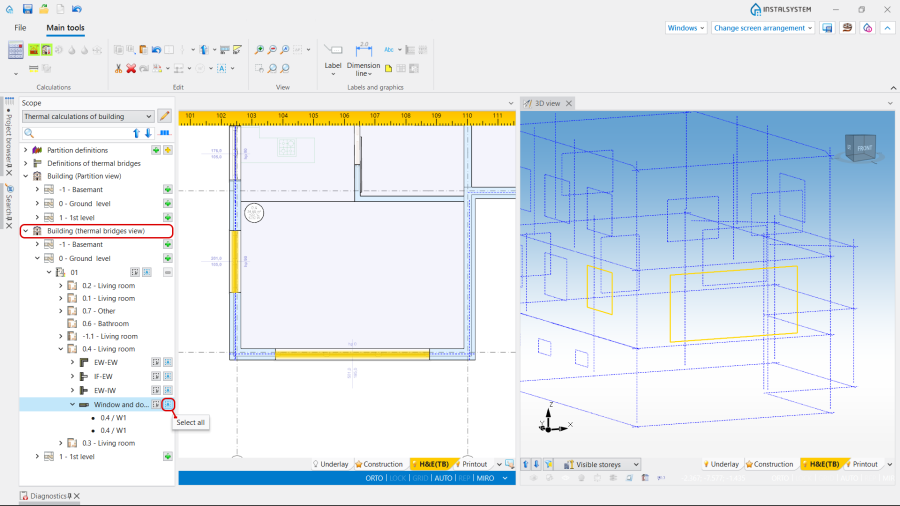
4. widok mostków cieplnych. - The selection of linear thermal bridges directly in the Edytor 2D window or Widok 3D is also possible in the OZC(MC) scope by clicking on its graphic representation;
- The linear thermal bridges of a defined type can be selected with the use of the buttons available at the Definicje mostków cieplnych;

5. Selection of thermal bridges of a defined type. - Manual editing of automatically assigned thermal bridges:
- The operations, available for the selected thermal bridge, are the following:
- Manual change of Definicja mostka cieplnego;
- Manual correction of the l ( Długość mostka cieplnego) of a linear thermal bridge.
- Unchecking check box Uwzględniaj w obliczeniach;
- Change of Styl elementu and addition of Opis.
- The operations, available for the selected thermal bridge, are the following:


Scenario IV - Method of accounting point thermal bridges
- Editing the default data:
- In the Dane ogólne window, Obliczenia cieplne budynku, Normy i opcje obliczeń tab choose Automatyczna - na podstawie modelu cieplnego for the Metoda obliczania mostków cieplnych. Note: this method is available for the EN standards.
- Definition of point thermal bridges:
- After making Obliczenia the OZC(MC) (Mostki cieplne w obliczeniach przepływu ciepła przez przenikanie) scope with the representation of thermal bridges will be available in Edytor 2D and on Widok 3D. Open Przeglądarka projektu, Obliczenia cieplne budynku, Definicje mostków cieplnych, Mostki punktowe. Select point thermal bridge type from the offered list;
- The data of the selected type will be available in the Tabela danych:
- Nazwa,
- Opis,
- Współczynnik przenikania ciepła punktowego mostka cieplnego (Współczynnik przenikania ciepła punktowego mostka cieplnego),
- Uwzględnij dla definicji przegrody - when opening the field the definition grouped for the partitions will be available. This is possible to select one or more partition definitions,
- Pole with two variants to choose from: Na m2 przegrody cieplnej and Na przegrodę cieplną,
- Ilość mostków punktowych. Note: The correction of this field is also possible after making Obliczenia.
- (Optionally) Copying an existing Definicja mostka cieplnego and modifying its data as above (e.g. to include the same bridge in different SZ definitions);
- (Optionally) Creating a new bridge definition, manually filling in the above data;
- (Optionally) Deletion of selected user definitions of bridges.
- Perform Obliczenia, resulting in automatic detection of point thermal bridges and their inclusion in the Obliczenia cieplne budynku;
- Overview of automatically recognized point thermal bridges and make manual edits, if necessary:
- Open Przeglądarka projektu, Obliczenia cieplne budynku, widok mostków cieplnych. After deploying the tree at the Pomieszczenie level, an expandable Mostki punktowe branch is available below the branches with linear thermal bridge types,
- The сhosen bridges are presented in the Edytor 2D window and Widok 3D on a separate edit scope OZC(MC).
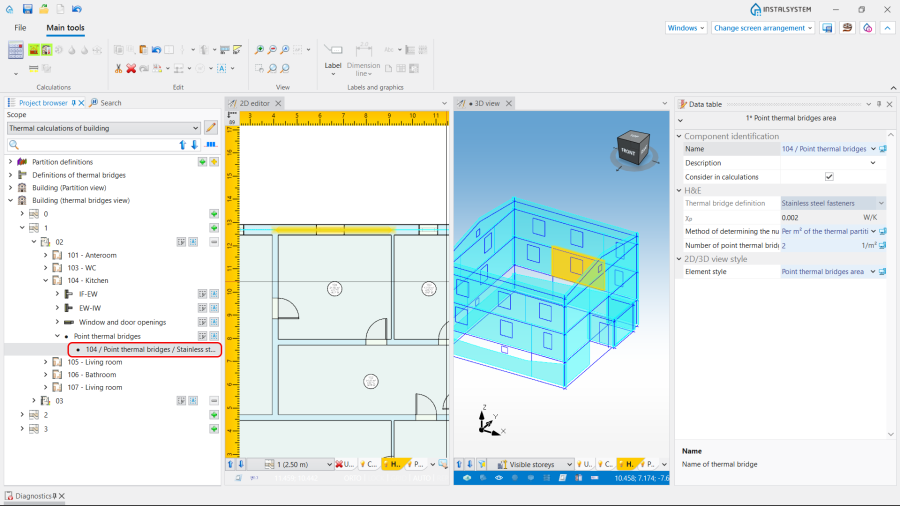
6. Mostki punktowe. - Manual editing of the point bridge area data:
- The operations, available for the selected thermal bridge, are the following:
- Change of Sposób określania ilości mostków punktowych, status AUTO / MANUAL (
 /
/  ):
):
- AUTO allows to determine the Ilość mostków punktowych according to bridge definition.
- MANUAL gives the possibility to change the default method and to define individually the Ilość mostków punktowych to be taken into account (via the fields Na m2 przegrody cieplnej or Na przegrodę cieplną).
- Unchecking check box Uwzględniaj w obliczeniach;
- Change of Styl elementu and addition of Opis.
- Change of Sposób określania ilości mostków punktowych, status AUTO / MANUAL (
- The operations, available for the selected thermal bridge, are the following:


