Projektowanie instalacji kanalizacji deszczowej: Różnice pomiędzy wersjami
MK czytacz (dyskusja | edycje) Nie podano opisu zmian |
Nie podano opisu zmian |
||
| Linia 1: | Linia 1: | ||
{| | {{Article table | ||
|commercial_product1=InstalSystem 5 | |||
|p2 =<!--gdy jest kolejny produkt handlowy, zamienić na->"produkt_handlowy2="--> | |||
|p3 =<!--gdy jest kolejny produkt handlowy, zamienić na->"produkt_handlowy3="--> | |||
|- | |p4 =<!--gdy jest kolejny produkt handlowy, zamienić na->"produkt_handlowy3="--> | ||
|category1 =InstalSystem 5#Lekcje projektowania | |||
|category_name1 =LEKCJA PROJEKTOWANIA | |||
|c2 =<!--Jest kategoria -> zamienić na: "category2=" i uzupełnić link do sekcji kategorii na stronie głównej produktu--> | |||
|category_name2 =<!--podać nazwę kategorii "ZASTOSOWANIE"/"FUNKCJONALNOŚĆ"/...--> | |||
|c3 =<!--Jest kategoria -> zamienić na: "category3=" i uzupełnić link do sekcji kategorii na stronie głównej produktu--> | |||
|category_name3 =<!--podać nazwę kategorii "ZASTOSOWANIE"/"FUNKCJONALNOŚĆ"/...--> | |||
|version1 =2023-12-06 | |||
|v2 =<!--Jest wersja -> zamienić na: "version2=" i uzupełnić link do sekcji RN danego produktu--> | |||
|v3 =<!--Jest wersja -> zamienić na: "version2=" i uzupełnić link do sekcji RN danego produktu--> | |||
|v4 =<!--Jest wersja -> zamienić na: "version2=" i uzupełnić link do sekcji RN danego produktu--> | |||
}} | |||
==Zakres lekcji== | |||
Artykuł prezentuje podstawową ścieżkę projektowania wewnętrznej instalacji kanalizacji deszczowej grawitacyjnej. | |||
Moduł kanalizacji deszczowej grawitacyjnej przeznaczony jest do projektowania i obliczania instalacji odwadniającej dach płaski lub inną powierzchnię płaską np. taras. Rynny nie są uwzględnione, dlatego dachy pochyłe nie są objęte zakresem projektu. Obliczenia przeprowadzono w oparciu o normę EN 12056-3.<br/> | |||
Moduł ma oddzielny checkbox w oknie ''<IS_TS id=ZakresProjektu/>''. It has its own ''<IS_TS id=btProjectOptions/>'', piping and calculation options, element styles and own editing scope in the graphic editor and model view. The button to start calculations is shared with the sanitary sewage module, as well as ''<IS_TS id=btCheckFlow/>'' button. | |||
== | ==Modules and program configuration== | ||
'''InstalSystem 5''' with the module: | |||
*'''''<IS_TS id=PH_IS5_RW/>'''''. | |||
== | ==Project file== | ||
The project file used in this lesson: [[Rainwater drainage installation in a multifamily building (example for the lesson)]]. | |||
== | ==Initial state== | ||
The project contains complete default data configured in the template file. The building structure has been elaborated on the basis of DWG layouts. | |||
==Steps to perform== | |||
===Opening the project file=== | |||
# When creating a new design, select from the list the template that contains the default data for the drainage system, | |||
# (or): upload an existing building structure file - minimum content is correct ordinates and slab thicknesses. | |||
Verify and correct if necessary data that has a significant impact on the geometry of the drainage installation: | |||
* the ''<IS_TS id=strl_expidISFOZCDaneOgolneRzednaGruntu/>'' or the ''<IS_TS id=rpCreateGround/>''; | |||
* the ''<IS_TS id=depthCaption/>'' of the slabs on particular storeys ('''''ATTENTION! this may affect previously completed or planned designs of other installations in this file) - applies to terrace drainage; | |||
* the ''<IS_TS id=SzczytDachuHint/>'' and shape of the roof if the file contains the complete building structure. | |||
===Editing the general project data=== | |||
Fill in the default data in the ''<IS_TS id=btProjectOptions/>'' window: | |||
# ''<IS_TS id=ZakresProjektu/>'' - determine project scope: ''<IS_TS id=InstalacjeKanalizacjiDeszczowej/>''.<br/>[[File:Rainwater Project scope.png|900 px|left|thumb|1. <IS_TS id=ZakresProjektu/>.]]<br clear="all"/> | |||
# ''<IS_TS id=rsObslugaKatalogowHint/>'' – select and move necessary catalogues to the ''<IS_TS id=strDstLabelCaption/>'' table. To speed up the selection, the filters can be used. {{Info}} [[Using catalogues and catalogues data in the project]]. | |||
# ''<IS_TS id=rsDanog_Normy/>'' – verify and correct if necessary: | |||
#* ''<IS_TS id=strNatezenieOpadowKanDeszcz/>'', | |||
#* ''<IS_TS id=SpadkiIWypelnienia/>''.<br/>[[File:Rainwater Calculation standarts.png|900 px|left|thumb|2. <IS_TS id=rsDanog_Normy/>.]]<br clear="all"/> | |||
# ''<IS_TS id=InstalacjeKanalizacjiDeszczowej/>'' / ''<IS_TS id=InstalacjaRozprowadzajaca/>'' / ''<IS_TS id=DaneInstalacjiRozprowadzajacejCzynnikGrzewczyChlodniczy/>'' – append default types: | |||
#* ''<IS_TS id=DomyslnyTypRurKanalizacjaDeszcz/>'', | |||
#* ''<IS_TS id=DomyslnySposobLaczeniaDzialek/>''.<br/>[[File:Rainwater Types and default data.png|900 px|left|thumb|3. <IS_TS id=DaneInstalacjiRozprowadzajacejCzynnikGrzewczyChlodniczy/>.]]<br clear="all"/> | |||
# ''<IS_TS id=strPSPRFOpcjeDoboruRur/>''. | |||
# ''<IS_TS id=StoreyManagement/>'' – verify and correct if necessary: | |||
#* ''<IS_TS id=strOdlegloscOdGornegoStropuSiecOdplywowaSymbol/>'' - <IS_TS id=strOdlegloscOdGornegoStropuSiecOdplywowaCaption/><br/>[[File:Rainwater Point of passage of the stack to the collector.png|900 px|left|thumb|4. <IS_TS id=strOdlegloscOdGornegoStropuSiecOdplywowaSymbol/>.]]<br clear="all"/> | |||
#* ''<IS_TS id=DistanceConnectionFromFloorInWall/>'' - <IS_TS id=DistanceConnectionFromFloorInWallHint/><br/>[[File:Rainwater Distance from the floor.png|900 px|left|thumb|5. <IS_TS id=DistanceConnectionFromFloorInWall/>.]]<br clear="all"/> | |||
# If the layout is the same on each floor, copy repetitive parts of the installation to other storeys using ''<IS_TS id=InstallationCopyOnStoreyUp/>'' or ''<IS_TS id=InstallationCopyOnManyStoreys/>'' function. | |||
===Editing the installation and its data=== | |||
Carry out inserting and graphic editing operations using the ''<IS_TS id=strAUTOModeName/>'' and ''<IS_TS id=strORTOModeName/>'' modes. | |||
# Select editing scope ''<IS_TS id=strInstalacjaKanalizacjaDeszcz/>''; | |||
# Insert the ''<IS_TS id=iNameWpust/>'' elements: ''<IS_TS id=rpWpustPunktowyDachowy/>'' and ''<IS_TS id=WpustPodlogowy/>'', taking into account the building construction. Divide the catchment into parts according to the roof slopes; | |||
# Specify the ''<IS_TS id=strpnstrPrfPowZlewni/>'' for each using the ''<IS_TS id=iNameAreaMeasure/>'' function.<br/>{{#ev:youtube|LcSIPPv_6Fs|900||||rel=0}} | |||
# Insert the ''<IS_TS id=PionKanalizacji/>'' elements and enter its data in the ''<IS_TS id=DataEditorTable/>'' window: | |||
#* In the ''<IS_TS id=pcstrXY/>'' section, declare the range of storeys of the ''<IS_TS id=PionKanalizacji/>''. | |||
#* Choose the ''<IS_TS id=EndOfSewerageLine/>'';<br/>[[File:Rainwater Stack.png|900 px|left|thumb|6. <IS_TS id=PionKanalizacji/> data.]]<br clear="all"/> | |||
#** For the ''<IS_TS id=WpustPunktowyDeszcz/>'' check and correct if necessary its ''<IS_TS id=stringTypElementu/>'' and insert the value of the ''<IS_TS id=strpnstrPrfPowZlewni/>''; | |||
#** For the case when the ''<IS_TS id=ZakonczeniePionuPolaczenieZPionemWyzej/>'' is chosen declare the point ''<IS_TS id=PolaczDoPionuOSymbolu/>'' and set the ''<IS_TS id=OdlegloscOdStropuPolaczeniaZPionemWyzej/>''. | |||
# Insert the ''<IS_TS id=iNameSanUjscieSciekowDeszczowych/>'' and verify its position in the model. '''''ATTENTION! In one rainwater drainage installation can be only one <IS_TS id=iNameSanUjscieSciekowDeszczowych/> element. But there can be several installations in one project.''''' | |||
# Connect the ''<IS_TS id=PionKanalizacji/>'' with the ''<IS_TS id=iNameWpust/>'' elements using the ''<IS_TS id=strKanalizacjaWewnDeszcz/>'' pipe-runs. If the ''<IS_TS id=iNameWpust/>'' should be connected on an elevation different than the default, change ''<IS_TS id=strOdlegloscOdPodlogiWlaczeniaDoPionuMethod/>'' to ''<IS_TS id=sOdlegloscOdPodlogiWlaczeniaDoPionuMethodPrzezUsera/>'', then set manually the required value of ''<IS_TS id=sOdlegloscOdPodlogiWlaczeniaDoPionuCaption/>''.<br/>[[File:Rainwater Mehod declering point of connection.png |900 px|left|thumb|7. <IS_TS id=strOdlegloscOdPodlogiWlaczeniaDoPionuMethod/>.]]<br clear="all"/> | |||
# Connect ''<IS_TS id=iNameSanUjscieSciekowDeszczowych/>'' with the ''<IS_TS id=PionKanalizacji/>'' elements on the lowest storey to form the sewer collector network. This network is configured with consideration of the value of ''<IS_TS id=strOdlegloscOdGornegoStropuSiecOdplywowaSymbol/>'' set in the ''<IS_TS id=rsDanogi/>'' window. | |||
# (Optional) If needed, change the way of realizing chosen pipe-run's nodes to other than the default, set in general data. It is possible in the ''<IS_TS id=DataEditorTable/>'' window for the ''<IS_TS id=PiperunEndNode/>'' element. | |||
# Insert necessary ''<IS_TS id=ctgstringArmaturaCOSAN/>'' in the ''<IS_TS id=GraphicalEdit/>'' or on the ''<IS_TS id=View3D/>'':''<IS_TS id=pinNameObejscie/>'' and ''<IS_TS id=pinNameOsadnik/>''.<br/>Choose the ''<IS_TS id=stringTypElementu/>'' from available catalogues and, if necessary, adjust the ''<IS_TS id=KatObrotu/>''.<br/>[[File:Rainwater Insert fittings.png |900 px|left|thumb|8. Insert <IS_TS id=ctgstringArmaturaCOSAN/>.]]<br clear="all"/> | |||
===Verifying the correctness of the installation structure.=== | |||
* Verify the correctness of the connections of the installation components using the ''<IS_TS id=btCheckFlow/>'' function (Shortcut: Shift + F2); | |||
* Verify the correctness of the installation structure using the ''<IS_TS id=View3D/>''; | |||
* Adjust the layout of the pipe-runs according to external factors, e.g. passages through walls, overlaps with other installations. | |||
===Running the calculations=== | |||
# Start the calculation of the ''<IS_TS id=InstalacjeKanalizacyjne/>'' by clicking [[File:Tap-Drainage-Calculator.png|25 px]] in the ''<IS_TS id=sObliczenie/>'' section of the toolbar; | |||
# Сheck messages the ''<IS_TS id=ErrorModuleTitle/>'' window. First of all, eliminate ''<IS_TS id=cErrorStringPlural/>''; | |||
# Verify and adjust if necessary the layout of the installation: gradients, collisions, overlapping junctions, etc. | |||
After the calculations, the vertical passage of the installation can be corrected by: | |||
* imposing proper values in the ''<IS_TS id=DataEditorTable/>'' window for the ''<IS_TS id=iNameSanDzialkaKanalizacjiDeszczGraw/>'' element in the following fields: ''<IS_TS id=strSpadekLong/>'', ''<IS_TS id=ZValuePiperunEndPoint1/>'', ''<IS_TS id=ZValuePiperunEndPoint2/>'', | |||
* dividing the chosen pipe-runs into parts and modifying their data. </br> It is recommended to implement such changes gradually and to observe their influence upon the system, as the change in one node after calculations may have a significant impact on positioning of its greater part. | |||
'''''Note:''''' Defining the vertical passage of pipe-runs, the program does not exceed the value imposed in the ''<IS_TS id=strMaxSlope/>'' field in the ''<IS_TS id=rsDanogi/>'' window in the ''<IS_TS id=rsDanog_Normy/>'' tab. This value is also automatically propagated to data of all pipe-runs. In case a difference of ordinates between the end of the calculated pipe-run and another pipe-run or a sewage outlet occurs, an additional vertical pipe-run is generated. To avoid it, allow for a greater gradient, by augmenting individually for each pipe-run a new value in the ''<IS_TS id=strMaxSlopeCaption/>'' field of the ''<IS_TS id=DataEditorTable/>'' and then recalculating the project. | |||
< | ===Verification of results=== | ||
[[ | * After calculations, the system layout should be verified visually by means of the ''<IS_TS id=View3D/>''; | ||
[[Category: | * If the calculations end with at least one error, the layout may be unreliable; | ||
[[Category: | * The sized diameters of the pipe-runs and fittings can be verified directly in the drawings.<br/>[[File:Rainwater Visual verification in 3D view.png|900 px|left|thumb|9. Visual verification in the <IS_TS id=View3D/> window.]]<br clear="all"/> | ||
* If a catalogue with visualisation of fittings (like tees, bends etc.) is used in the project, it can helpful in assessing the correctness of fittings selection and sizing for pipe-run nodes (junctions). To do so, node visualisation should be turned on in the ''<IS_TS id=rsDanogi/>'' window, on the ''<IS_TS id=OpcjeRysowania/>'' tab, or using the icon of the ''<IS_TS id=InstallationElementsVisibility/>'' directly in the ''<IS_TS id=View3D/>''.<br/>[[File:Rainwater Fittings visualisation.png|900 px|left|thumb|10. <IS_TS id=strWizualizacjaKsztaltekKanalizacji/>.]]<br clear="all"/>'''''Note:''''' By default, only the nodes with correctly selected fittings, for which there are no warnings in the ''<IS_TS id=ErrorModuleTitle/>'' window, are visualised. | |||
* Other forms of presentation of calculation results are: component labels and tables of results {{Info}} [[Presentation of the calculations result]] <br/>[[File:Rainwater Result.png |900 px|left|thumb|11. <IS_TS id=sZestawienieRurKsztaltekIZlaczek/>.]]<br clear="all"/> | |||
===Preparing drawings for export/printing=== | |||
# To have the results for pipe-runs and installation nodes included in the printout of a drawing, appropriate labels must be inserted {{Info}} [[Export / print results and drawings#Preparation of drawings for export / printing|Preparation of drawings for export / printing]] | |||
# Completed drawings can be printed and/or exported {{Info}} [[Export / print results and drawings]] | |||
[[Category:InstalSystem 5]] | |||
[[Category:LEKCJA PROJEKTOWANIA]] | |||
Wersja z 15:14, 28 gru 2023
| Produkt | InstalSystem 5 |
| Typ artykułu | LEKCJA PROJEKTOWANIA |
| Ostatnia aktualizacja | 2023-12-06 |
Zakres lekcji
Artykuł prezentuje podstawową ścieżkę projektowania wewnętrznej instalacji kanalizacji deszczowej grawitacyjnej.
Moduł kanalizacji deszczowej grawitacyjnej przeznaczony jest do projektowania i obliczania instalacji odwadniającej dach płaski lub inną powierzchnię płaską np. taras. Rynny nie są uwzględnione, dlatego dachy pochyłe nie są objęte zakresem projektu. Obliczenia przeprowadzono w oparciu o normę EN 12056-3.
Moduł ma oddzielny checkbox w oknie Zakres projektu. It has its own Dane ogólne, piping and calculation options, element styles and own editing scope in the graphic editor and model view. The button to start calculations is shared with the sanitary sewage module, as well as Sprawdź połączenia button.
Modules and program configuration
InstalSystem 5 with the module:
- Instalacje kanalizacji deszczowej grawitacyjnej.
Project file
The project file used in this lesson: Rainwater drainage installation in a multifamily building (example for the lesson).
Initial state
The project contains complete default data configured in the template file. The building structure has been elaborated on the basis of DWG layouts.
Steps to perform
Opening the project file
- When creating a new design, select from the list the template that contains the default data for the drainage system,
- (or): upload an existing building structure file - minimum content is correct ordinates and slab thicknesses.
Verify and correct if necessary data that has a significant impact on the geometry of the drainage installation:
- the Rzędna gruntu or the Modelowanie gruntu;
- the Grubość of the slabs on particular storeys (ATTENTION! this may affect previously completed or planned designs of other installations in this file) - applies to terrace drainage;
- the Rzędna szczytu dachu and shape of the roof if the file contains the complete building structure.
Editing the general project data
Fill in the default data in the Dane ogólne window:
- Zakres projektu - determine project scope: Instalacje kanalizacji deszczowej.
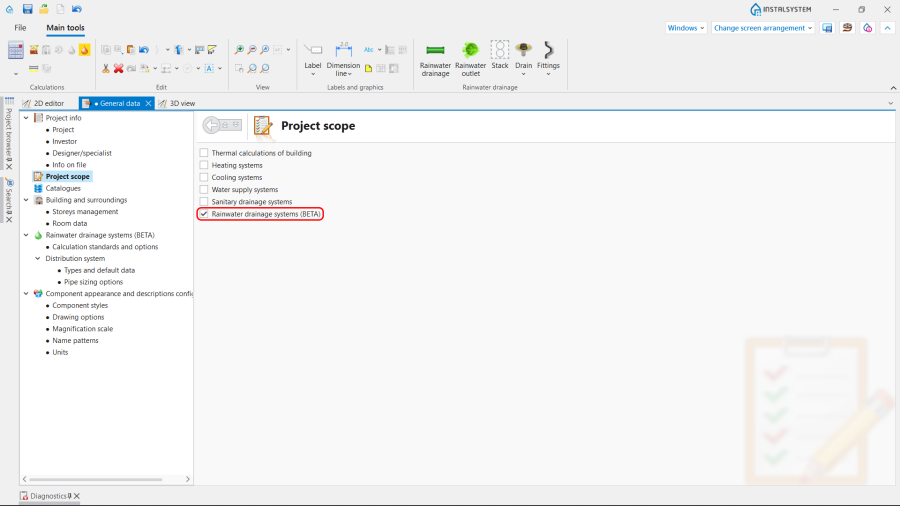
1. Zakres projektu. - Katalogi produktów – select and move necessary catalogues to the Katalogi w projekcie: table. To speed up the selection, the filters can be used. Więcej informacji na ten temat: Using catalogues and catalogues data in the project.
- Normy i opcje obliczeń – verify and correct if necessary:
- Natężenie opadów,
- Spadki i wypełnienia.
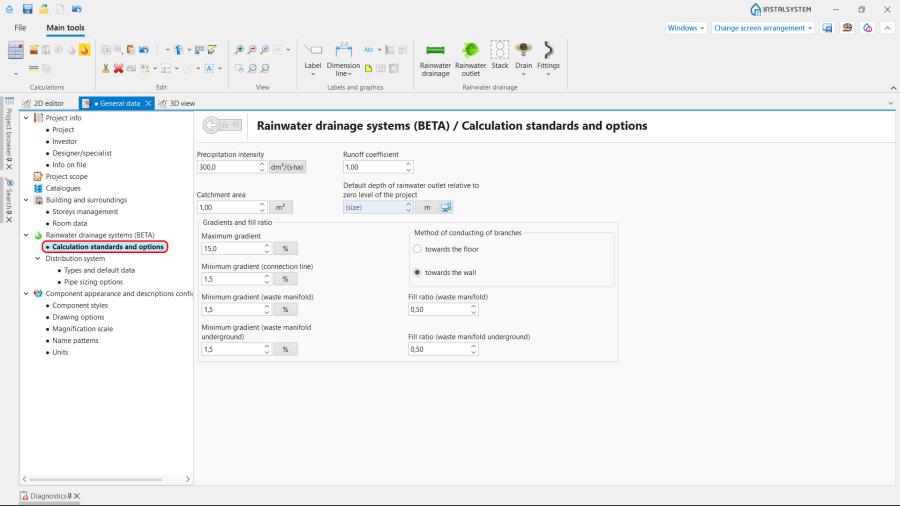
2. Normy i opcje obliczeń.
- Instalacje kanalizacji deszczowej / Instalacja rozprowadzająca / Typy i dane domyślne – append default types:
- Domyślny typ rur: Kanalizacja deszczowa,
- Domyślne sposoby realizacji połączeń.

3. Typy i dane domyślne.
- Opcje doboru rur.
- Zarządzanie kondygnacjami – verify and correct if necessary:
- Punkt przejścia pionu w sieć - Określenie rzędnej punktów przejścia pionów w sieć odpływową. Należy ustawić dla tej kondygnacji, na której narysowano sieć odpływową.

4. Punkt przejścia pionu w sieć. - Odległość od podłogi punktów włączeń do pionu - Dla danej kondygnacji, domyślna odległość od podłogi punktu, w którym podejścia od przyborów będą włączane do pionu. Dla każdego podejścia można to zmienić w tabeli danych działki włączonej do pionu.

5. Odległość od podłogi punktów włączeń do pionu .
- Punkt przejścia pionu w sieć - Określenie rzędnej punktów przejścia pionów w sieć odpływową. Należy ustawić dla tej kondygnacji, na której narysowano sieć odpływową.
- If the layout is the same on each floor, copy repetitive parts of the installation to other storeys using Utwórz kopię zaznaczonych elementów na kondygnacji powyżej or Utwórz kopię zaznaczonych elementów na wielu kondygnacjach function.


Editing the installation and its data
Carry out inserting and graphic editing operations using the AUTO and ORTO modes.
- Select editing scope Kanalizacja (D);
- Insert the Wpust elements: Wpust dachowy and Wpust podłogowy, taking into account the building construction. Divide the catchment into parts according to the roof slopes;
- Specify the Efektywna powierzchnia zlewni for each using the Pomiar powierzchni function.
- Insert the Pion elements and enter its data in the Tabela danych window:
- In the Położenie section, declare the range of storeys of the Pion.
- Choose the Elem. zakończenia pionu;
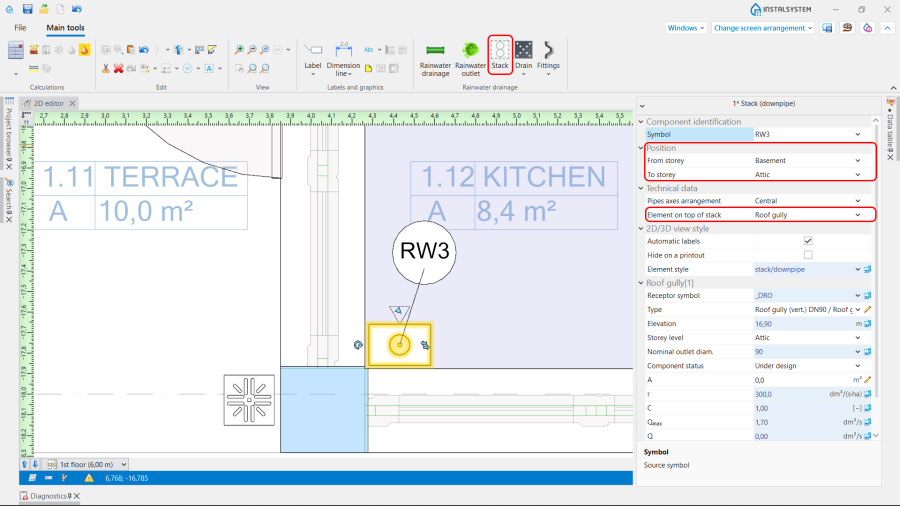
6. Pion data.
- For the Wpust dachowy check and correct if necessary its Typ and insert the value of the Efektywna powierzchnia zlewni;
- For the case when the Połączenie z pionem wyżej is chosen declare the point Połącz do pionu o symbolu and set the Odl. od stropu połączenia z pionem wyżej.
- Insert the Ujście ścieków deszczowych and verify its position in the model. ATTENTION! In one rainwater drainage installation can be only one Ujście ścieków deszczowych element. But there can be several installations in one project.
- Connect the Pion with the Wpust elements using the Kanalizacja deszczowa pipe-runs. If the Wpust should be connected on an elevation different than the default, change Sposób deklaracji punktu włączenia do pionu to Zdefiniowana przez użytkownika, then set manually the required value of Odległość od podłogi punktu włączenia do pionu.

7. Sposób deklaracji punktu włączenia do pionu. - Connect Ujście ścieków deszczowych with the Pion elements on the lowest storey to form the sewer collector network. This network is configured with consideration of the value of Punkt przejścia pionu w sieć set in the Dane ogólne window.
- (Optional) If needed, change the way of realizing chosen pipe-run's nodes to other than the default, set in general data. It is possible in the Tabela danych window for the Węzeł element.
- Insert necessary Armatura in the Edytor 2D or on the Widok 3D:Obejście and Osadnik.
Choose the Typ from available catalogues and, if necessary, adjust the Kąt obrotu.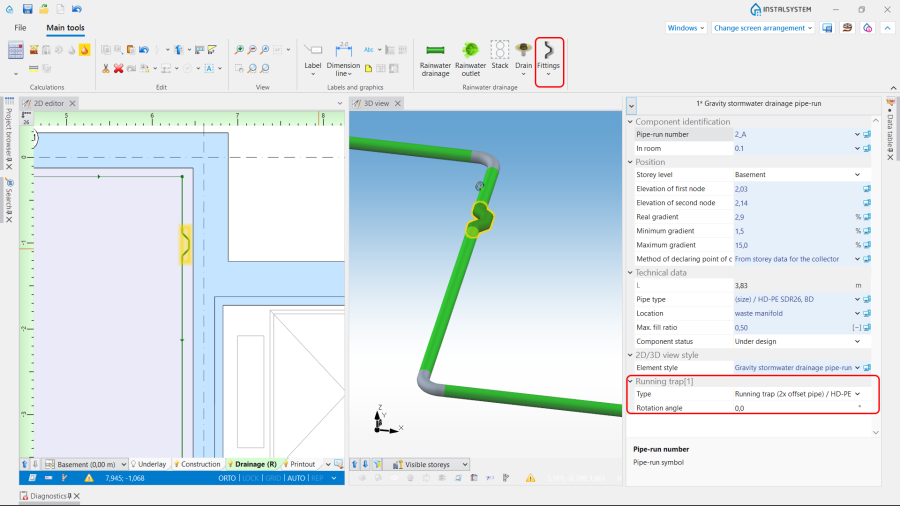
8. Insert Armatura.


Verifying the correctness of the installation structure.
- Verify the correctness of the connections of the installation components using the Sprawdź połączenia function (Shortcut: Shift + F2);
- Verify the correctness of the installation structure using the Widok 3D;
- Adjust the layout of the pipe-runs according to external factors, e.g. passages through walls, overlaps with other installations.
Running the calculations
- Start the calculation of the Instalacje kanalizacyjne by clicking
 in the Obliczenia section of the toolbar;
 - Сheck messages the Diagnostyka window. First of all, eliminate Błędy;
- Verify and adjust if necessary the layout of the installation: gradients, collisions, overlapping junctions, etc.

After the calculations, the vertical passage of the installation can be corrected by:
- imposing proper values in the Tabela danych window for the Działka kanalizacji deszczowej grawitacyjnej element in the following fields: Spadek rzeczywisty, Rzędna 1. punktu działki, Rzędna 2. punktu działki,
- dividing the chosen pipe-runs into parts and modifying their data.
It is recommended to implement such changes gradually and to observe their influence upon the system, as the change in one node after calculations may have a significant impact on positioning of its greater part.
Note: Defining the vertical passage of pipe-runs, the program does not exceed the value imposed in the Spadek maksymalny field in the Dane ogólne window in the Normy i opcje obliczeń tab. This value is also automatically propagated to data of all pipe-runs. In case a difference of ordinates between the end of the calculated pipe-run and another pipe-run or a sewage outlet occurs, an additional vertical pipe-run is generated. To avoid it, allow for a greater gradient, by augmenting individually for each pipe-run a new value in the Spadek maksymalny field of the Tabela danych and then recalculating the project.
Verification of results
- After calculations, the system layout should be verified visually by means of the Widok 3D;
- If the calculations end with at least one error, the layout may be unreliable;
- The sized diameters of the pipe-runs and fittings can be verified directly in the drawings.

9. Visual verification in the Widok 3D window. - If a catalogue with visualisation of fittings (like tees, bends etc.) is used in the project, it can helpful in assessing the correctness of fittings selection and sizing for pipe-run nodes (junctions). To do so, node visualisation should be turned on in the Dane ogólne window, on the Opcje rysowania tab, or using the icon of the Widoczność elementów instalacji directly in the Widok 3D.
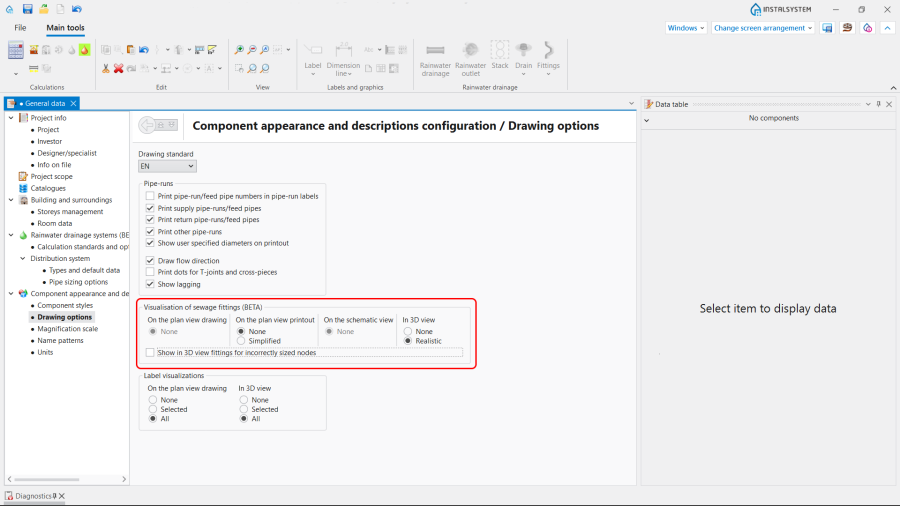
10. Wizualizacja kształtek kanalizacyjnych.
Note: By default, only the nodes with correctly selected fittings, for which there are no warnings in the Diagnostyka window, are visualised. - Other forms of presentation of calculation results are: component labels and tables of results Więcej informacji na ten temat: Presentation of the calculations result
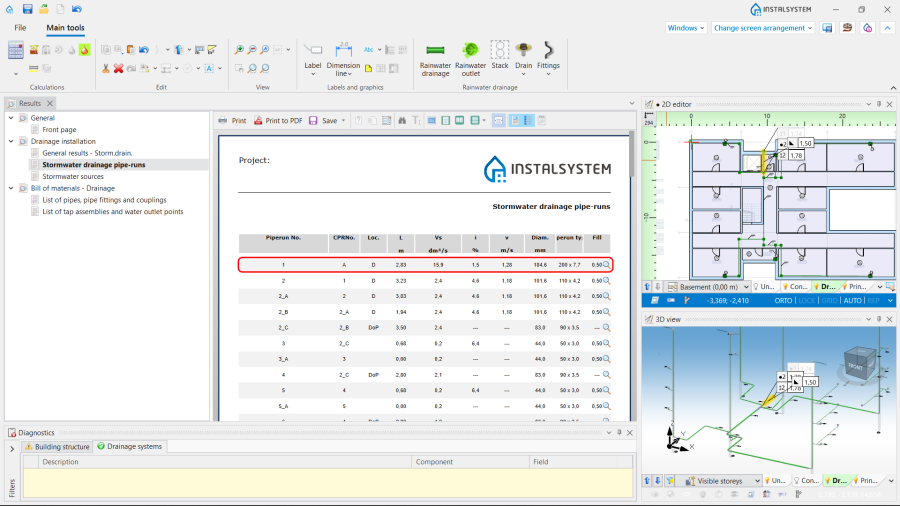
11. Zestawienie rur, kształtek i złączek.


Preparing drawings for export/printing
- To have the results for pipe-runs and installation nodes included in the printout of a drawing, appropriate labels must be inserted Więcej informacji na ten temat: Preparation of drawings for export / printing
- Completed drawings can be printed and/or exported Więcej informacji na ten temat: Export / print results and drawings