Wersja z dnia 14:56, 8 lip 2026 autorstwa Staneka(dyskusja | edycje)(Utworzono nową stronę "{{Article table |commercial_product1=NetSystem 5 |p2 =<!--gdy jest kolejny produkt handlowy, zamienić na->"produkt_handlowy2="--> |p3 =<!--gdy jest kolejny produkt handlowy, zamienić na->"produkt_handlowy3="--> |p4 =<!--gdy jest kolejny produkt handlowy, zamienić na->"produkt_handlowy3="--> |category1 =InstalSystem 5#Funkcjonalności |category_name1 =FUNKCJA I NARZĘDZIE |c2 =<!--Jest k…")
This article describes the methods of creating Profile of Sieci wodociągowe and Sieci kanalizacyjne.
The profile creation feature allows to:
automatically generate network profiles based on the prepared network. Profile are created according to user-defined routes. The appearance can be manually configured.
manually create network profiles without performing calculations.
Lokalizacja w programie
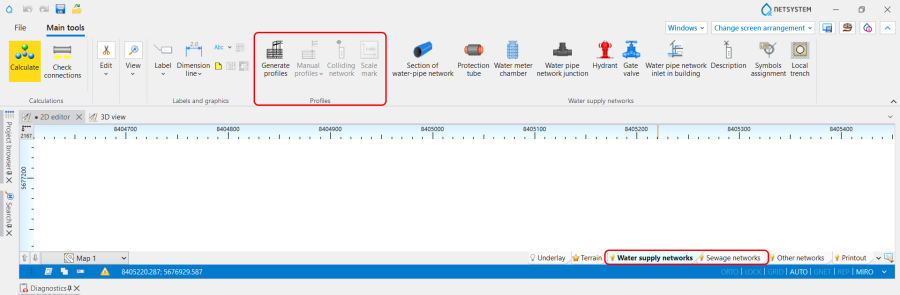
Icons of components and functions for the Profile creation are available on the Narzędzia główne bar in the Profile section when Sieci wodociągowe or Sieci kanalizacyjne scope is active: 1. Profile icons of components and functions.
List of all created in a project ProfileArkusze robocze is displayed in the graphic view management window. 2. List of ProfileArkusze robocze.
Add to the project and configure the Profile automatyczneArkusze robocze in the Dane ogólne window:
(Optionally) Select the Konfiguracja wyglądu profili,
(Optionally) Change the Scale , Poziom porównawczy , Odstęp pomiędzy profilami and Szerokość tabelki profilu for the Arkusz roboczy.
Define profiles routs
In the Edytor 2D window open Przeglądarka projektu and select ProfileSieci wodociągowe or ProfileSieci kanalizacyjne scope;
Choose Profile automatyczne / Definicje tras profilu;
Dodaj trasę profilu, specifying in the Tabela danych window:
Z arkusza - the Nazwa of Arkusze map from which the profile will be generated,
Na arkuszu - the Nazwa of Arkusze profili on which the profile will be generated. Note: Multiple profiles routes can be added to a single ProfilArkusz roboczy. They are displayed sequentially, using the distance defined for the Arkusz roboczy in the Odstęp pomiędzy profilami field.
Ozn. początku - select start destination from the list,
Ozn. końca - select end destination from the list. Note: The specified route will be highlighted on the Mapa so its correctness can be verified.
(Optionally) Change Typ początku - Zwykły or Skrócony.
Element Oznaczenie skali is available on Profile automatyczne and Profile ręczne worksheets for Sieci wodociągowe i kanalizacyjne; 10. Oznaczenie skali.
Element is not tied to the profile drawing - it can be inserted anywhere on the worksheet and freely moved;
The displayed on the Oznaczenie skali values of Skala pozioma and Skala pionowa are consistent with the data specified in the Dane ogólne window and are automatically updated with changes to the scale of the worksheet on which the element is placed;
The Czcionka and the Styl elementu can be modified.