Hydrauliczne węzły regulacyjne: Różnice pomiędzy wersjami
Nie podano opisu zmian |
Nie podano opisu zmian |
||
| Linia 4: | Linia 4: | ||
|p3 =<!--gdy jest kolejny produkt handlowy, zamienić na->"produkt_handlowy3="--> | |p3 =<!--gdy jest kolejny produkt handlowy, zamienić na->"produkt_handlowy3="--> | ||
|p4 =<!--gdy jest kolejny produkt handlowy, zamienić na->"produkt_handlowy3="--> | |p4 =<!--gdy jest kolejny produkt handlowy, zamienić na->"produkt_handlowy3="--> | ||
|category1 =InstalSystem 5# | |category1 =InstalSystem 5#Funkctionalities | ||
|category_name1 = | |category_name1 =FUNCTION AND TOOL | ||
|c2 =<!--Jest kategoria -> zamienić na: "category2=" i uzupełnić link do sekcji kategorii na stronie głównej produktu--> | |c2 =<!--Jest kategoria -> zamienić na: "category2=" i uzupełnić link do sekcji kategorii na stronie głównej produktu--> | ||
|category_name2 =<!--podać nazwę kategorii "ZASTOSOWANIE"/"FUNKCJONALNOŚĆ"/...--> | |category_name2 =<!--podać nazwę kategorii "ZASTOSOWANIE"/"FUNKCJONALNOŚĆ"/...--> | ||
|c3 =<!--Jest kategoria -> zamienić na: "category3=" i uzupełnić link do sekcji kategorii na stronie głównej produktu--> | |c3 =<!--Jest kategoria -> zamienić na: "category3=" i uzupełnić link do sekcji kategorii na stronie głównej produktu--> | ||
|category_name3 =<!--podać nazwę kategorii "ZASTOSOWANIE"/"FUNKCJONALNOŚĆ"/...--> | |category_name3 =<!--podać nazwę kategorii "ZASTOSOWANIE"/"FUNKCJONALNOŚĆ"/...--> | ||
|version1 = | |version1 =2026-01-27 | ||
|v2 =<!--Jest wersja -> zamienić na: "version2=" i uzupełnić link do sekcji RN danego produktu--> | |v2 =<!--Jest wersja -> zamienić na: "version2=" i uzupełnić link do sekcji RN danego produktu--> | ||
|v3 =<!--Jest wersja -> zamienić na: "version2=" i uzupełnić link do sekcji RN danego produktu--> | |v3 =<!--Jest wersja -> zamienić na: "version2=" i uzupełnić link do sekcji RN danego produktu--> | ||
| Linia 16: | Linia 16: | ||
}} | }} | ||
== | ==Description== | ||
''<IS_TS id=iNameCOWezelRegulacyjny/>'' is the element used to hydraulically balance and regulate (qualitatively or quantitatively) the thermal efficiency of the end receiver (e.g., fan-coil or cooling beam). The article describes the ways of applying the element in the program. | |||
== | ==Location in program== | ||
''<IS_TS id=iNameCOWezelRegulacyjny/>'' is presented in the program as a separate module, the availability of which is visible in the ''InstalSystem 5.5 Manager'' / ''<IS_TS id=strHelp/>'' tab / list of ''<IS_TS id=DostepneModuly/>'' | |||
[[File:HCL module.png |900 px|left|thumb|1. <IS_TS id=iNameCOWezelRegulacyjny/> module.]]<br clear="all"/> | |||
To use the ''<IS_TS id=iNameCOWezelRegulacyjny/>'' element, the corresponding catalogues should be selected and added to the project in the ''<IS_TS id=rsDanogi/>'' window / ''<IS_TS id=strDlgKatalogiObslugaKatalogowHint/>'' tab. {{Info}} [[Using_catalogues_and_catalogues_data_in_the_project#Selecting_catalogues_for_the_project | Selecting catalogues for the project]]. | |||
[[File:HCL add catalogues.png |900 px|left|thumb|2. <IS_TS id=iNameCOWezelRegulacyjny/> <IS_TS id=strDlgKatalogiObslugaKatalogowHint/>.]]<br clear="all"/> | |||
The element can be placed on the drawing when ''<IS_TS id=ScopeInstalacjeKonwekcyjneShort/>'', ''<IS_TS id=ScopeInstalacjePodlogoweIScienneShort/>'' or ''<IS_TS id=ScopeInstalacjeSufitoweShort />'' editing scope is active: | |||
* clicking the icon ''<IS_TS id=iNameCOWezelRegulacyjny/>'' in the ''<IS_TS id=Rozprowadzenie/>'' - ''<IS_TS id=Cieplne/>'' tab in the ''<IS_TS id=NarzedziaGlowne/>'' menu: <br/>[[File:HCL icon location.png |900 px|left|thumb|3. <IS_TS id=iNameCOWezelRegulacyjny/> icon.]]<br clear="all"/> | |||
* clicking the icon with schemes presented by the particular producers: <br/>[[File:HCL prod location.png |900 px|left|thumb|4. <IS_TS id=iNameCOWezelRegulacyjny/> schemes.]]<br clear="all"/> | |||
== | ==Examples of use== | ||
''<IS_TS id=iNameCOWezelRegulacyjny/>'' is a prefabricated block of grouped elements and is not graphically editable. May include a pump, balancing valves, control valves and overflow-relief valve. Allows the use of valves and fittings only from a list of items, suitable for use in a given location, in a configuration precisely defined by producers.<br/><br/> | |||
====<IS_TS id=strpnOrientation/>==== | |||
[[File: | The ''<IS_TS id=strpnOrientation/>'' of the ''<IS_TS id=iNameCOWezelRegulacyjny/>'' is selected in the ''<IS_TS id=DataEditorTable/>'' window from the available variants.<br/>[[File:HCL orientation.png |900 px|left|thumb|5. <IS_TS id=iNameCOWezelRegulacyjny/> <IS_TS id=strpnOrientation/>.]]<br clear="all"/><br/> | ||
====<IS_TS id=strpnZrodloZastosowanie/>==== | |||
< | The ''<IS_TS id=strpnZrodloZastosowanie/>'' of the ''<IS_TS id=iNameCOWezelRegulacyjny/>'' is determined in accordance with the ''<IS_TS id=ZakresProjektu/>'' indicated in the ''<IS_TS id=rsDanogi/>'' window: | ||
* ''<IS_TS id=strNazwaWarstwyInstalacjiCOOP/>'', | |||
* ''<IS_TS id=Chlodzenie/>'', | |||
* ''<IS_TS id=OgrzewanieZChlodzeniem/>''. | |||
=== | ====<IS_TS id=stringTypElementu/>==== | ||
The ''<IS_TS id=stringTypElementu/>'' of the ''<IS_TS id=iNameCOWezelRegulacyjny/>'' сan be chosen from the catalogues, provided by the particular manufacturers, selected in the ''<IS_TS id=rsDanogi/>'' window / ''<IS_TS id=strDlgKatalogiObslugaKatalogowHint/>'' tab. {{Info}} [[Using catalogues and catalogues data in the project]].<br/> | |||
The selection is available in the ''<IS_TS id=DataEditorTable/>'' window and on the ''Ribbon''. In addition, the ''Ribbon'' icons provide a visualization of the proposed schemas for the arrangement of the ''<IS_TS id=iNameCOWezelRegulacyjny/>'' components.<br/>[[File:HCL toolbar.png |900 px|left|thumb|6. <IS_TS id=iNameCOWezelRegulacyjny/> visibility.]]<br clear="all"/><br/> | |||
=== | ====<IS_TS id=Wyglad2D3D/>==== | ||
''<IS_TS id=MieszaczPrezentacja2D/>'' and ''<IS_TS id=MieszaczPrezentacja3D/>'' of the ''<IS_TS id=iNameCOWezelRegulacyjny/>'' can be: | |||
* | * ''<IS_TS id=MieszaczPrezentacjaSzczegolowa/>'', | ||
* ''<IS_TS id=MieszaczPrezentacjaUproszczona/>''. | |||
[[File: | The dimensions of the ''<IS_TS id=iNameCOWezelRegulacyjny/>'' can be modified, if necessary.<br/>[[File:HCL 2D 3D presentation.png|900 px|left|thumb|7. ''<IS_TS id=iNameCOWezelRegulacyjny/>'' <IS_TS id=MieszaczPrezentacja2D/> and <IS_TS id=MieszaczPrezentacja3D/>.]]<br clear="all"/><br/> | ||
=== | ====<IS_TS id=ResultModuleTitle/>==== | ||
The ''<IS_TS id=iNameCOWezelRegulacyjny/>'' data is presented after performing ''<IS_TS id=sObliczenie/>'' of ''<IS_TS id=InstalacjeGrzewcze/>''/''<IS_TS id=InstalacjeChlodnicze/>'': | |||
* In the hint, displayed after placing the mouse cursor on the element, | |||
* In the element Label, | |||
* In the ''<IS_TS id=ResultModuleTitle/>'' tables,<br/>[[File:HCL Results.png |900 px|left|thumb|8. <IS_TS id=ResultModuleTitle/>.]]<br clear="all"/> | |||
* In the ''<IS_TS id=iNameTabelkaMieszacza/>''. {{Info}} [[Designing_of_radiant_heating_floor_and_wall_installation#Mixer_.2F_control_unit_chart | <IS_TS id=iNameTabelkaMieszacza/>]]. | |||
# | [[Category:InstalSystem 5]] | ||
[[Category:FUNCTION AND TOOL]] | |||
Wersja z 14:29, 5 maj 2026
| Produkt | InstalSystem 5 |
| Typ artykułu | FUNCTION AND TOOL |
| Ostatnia aktualizacja | 2026-01-27 |
Description
Węzeł regulacyjny is the element used to hydraulically balance and regulate (qualitatively or quantitatively) the thermal efficiency of the end receiver (e.g., fan-coil or cooling beam). The article describes the ways of applying the element in the program.
Location in program
Węzeł regulacyjny is presented in the program as a separate module, the availability of which is visible in the InstalSystem 5.5 Manager / Pomoc tab / list of Moduły dostępne w ramach aktualnej konfiguracji licencji:

To use the Węzeł regulacyjny element, the corresponding catalogues should be selected and added to the project in the Dane ogólne window / Katalogi produktów tab. Więcej informacji na ten temat: Selecting catalogues for the project.

The element can be placed on the drawing when Konwekcyjne, Podł./Ścienne or Sufitowe editing scope is active:
- clicking the icon Węzeł regulacyjny in the Rozprowadzenie - instalacje cieplne tab in the Narzędzia główne menu:
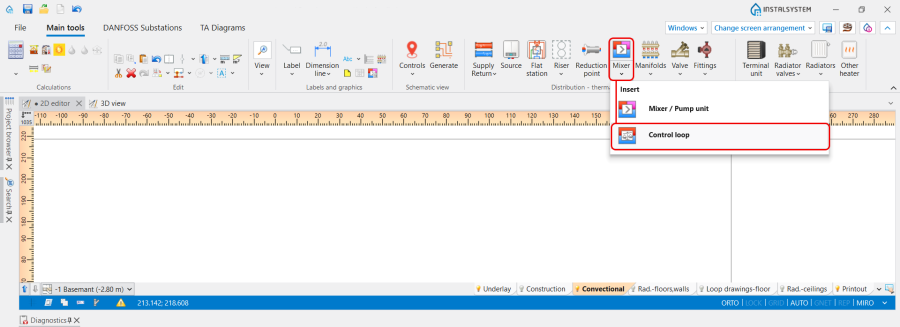
3. Węzeł regulacyjny icon. - clicking the icon with schemes presented by the particular producers:
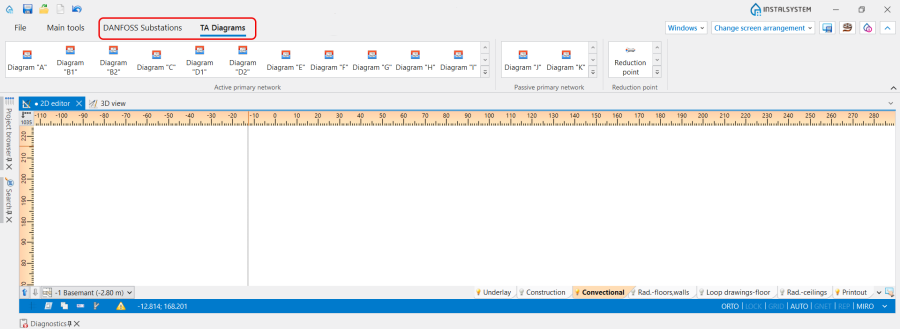
4. Węzeł regulacyjny schemes.


Examples of use
Węzeł regulacyjny is a prefabricated block of grouped elements and is not graphically editable. May include a pump, balancing valves, control valves and overflow-relief valve. Allows the use of valves and fittings only from a list of items, suitable for use in a given location, in a configuration precisely defined by producers.
Orientacja
The Orientacja of the Węzeł regulacyjny is selected in the Tabela danych window from the available variants.

Zastosowanie
The Zastosowanie of the Węzeł regulacyjny is determined in accordance with the Zakres projektu indicated in the Dane ogólne window:
- Ogrzewanie,
- Chłodzenie,
- Ogrzewanie i wydajność chłodnicza.
Typ
The Typ of the Węzeł regulacyjny сan be chosen from the catalogues, provided by the particular manufacturers, selected in the Dane ogólne window / Katalogi produktów tab. Więcej informacji na ten temat: Using catalogues and catalogues data in the project.
The selection is available in the Tabela danych window and on the Ribbon. In addition, the Ribbon icons provide a visualization of the proposed schemas for the arrangement of the Węzeł regulacyjny components.

Wygląd 2D/3D
Prezentacja 2D and Prezentacja 3D of the Węzeł regulacyjny can be:
- Szczegółowa,
- Uproszczona.
The dimensions of the Węzeł regulacyjny can be modified, if necessary.

Wyniki
The Węzeł regulacyjny data is presented after performing Obliczenia of Instalacje grzewcze/Instalacje chłodnicze:
- In the hint, displayed after placing the mouse cursor on the element,
- In the element Label,
- In the Wyniki tables,
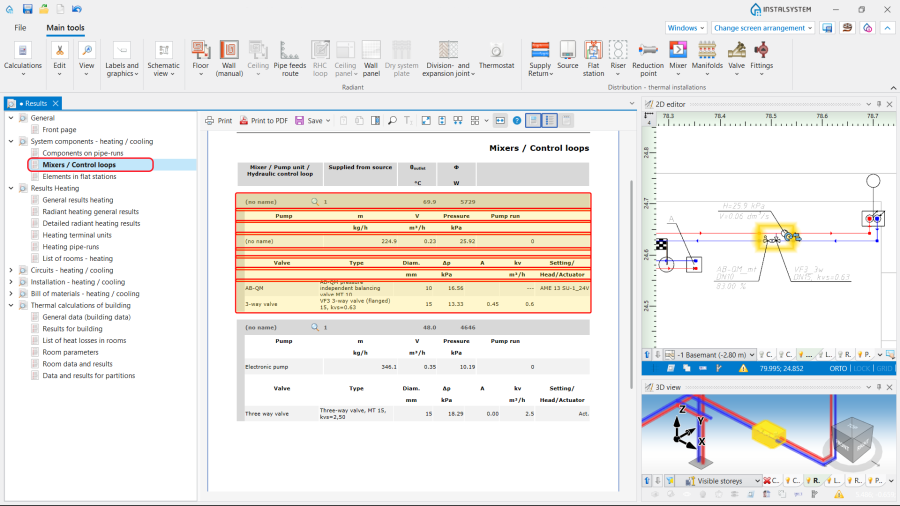
8. Wyniki. - In the Tabelka mieszacza / węzła regulacyjnego. Więcej informacji na ten temat: Tabelka mieszacza / węzła regulacyjnego.
